Ask a side question without derailing your chat
Select any passage in a ChatGPT answer and ask a follow-up in a side panel — a definition, a fact-check, a simpler explanation. You keep the context, your main conversation stays untouched.
4.5★ on Chrome Web Store · Pro feature · Updated June 2026
Click the video to expand
Quick Answer
Side Chat is a Pro feature in AI Workspace that lets you highlight any passage in a ChatGPT answer and ask a follow-up question in a separate side panel. It keeps the context of what you selected, streams the answer in real time, and renders it as clean markdown — all without adding a single message to your main conversation.
How people ask a quick side question today
Every workaround forces a trade-off between keeping your thread clean and keeping your context. Side Chat gives you both.
| Approach | Main thread stays clean | Keeps your context | Notes |
|---|---|---|---|
| Ask inline in the same thread | Pollutes your conversation and can derail the model | ||
| Start a brand-new chat | Clean — but you lose all the surrounding context | ||
| Open a second ChatGPT tab | Context-free and constant tab juggling | ||
| Side Chat | One click, keeps context, main thread untouched |
How Side Chat works
Select any passage
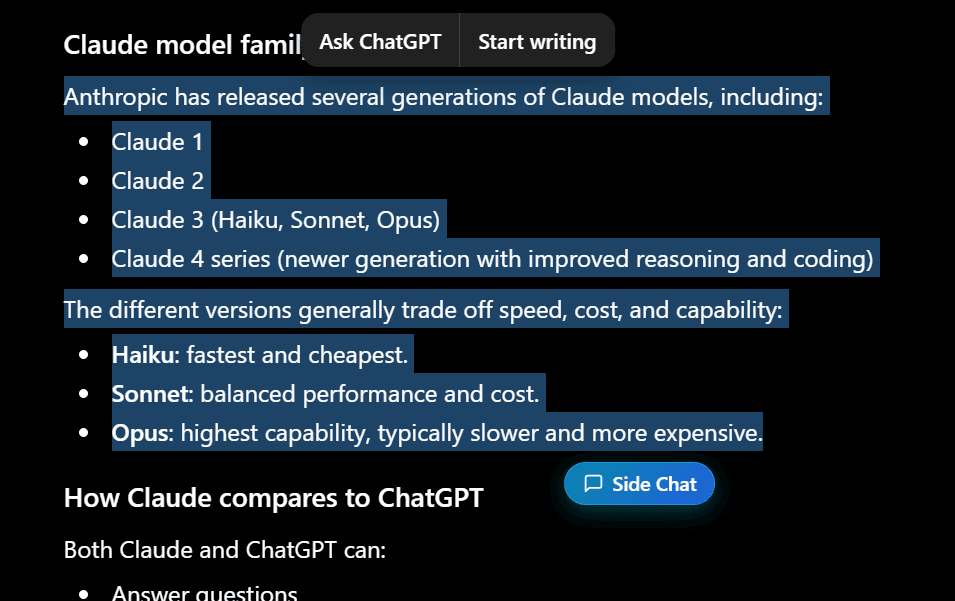
Highlight a sentence or paragraph in any ChatGPT answer. A “Side Chat” button appears right under your selection.
Ask your question
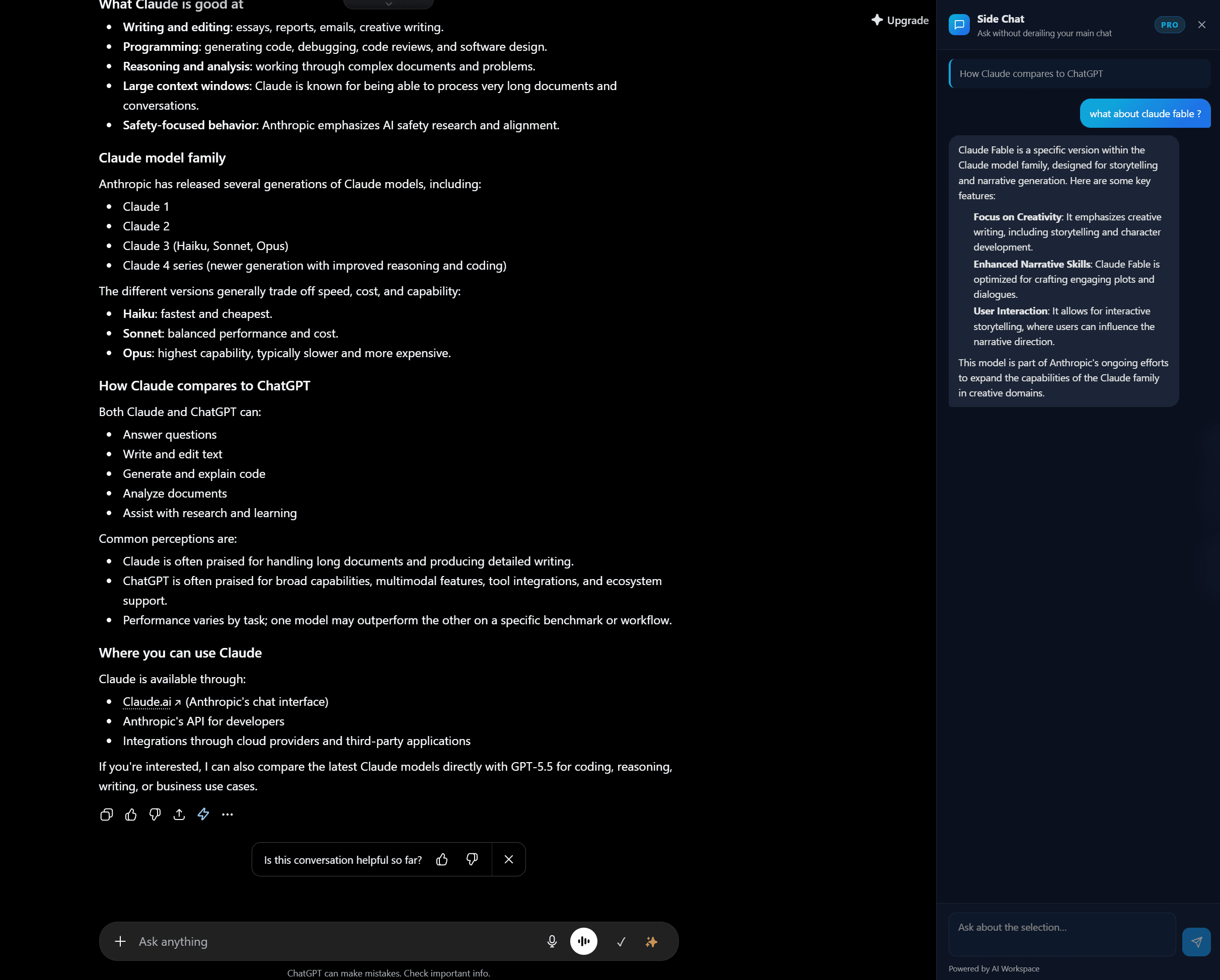
Click it and the side panel opens with your passage quoted. Ask anything about it — Side Chat keeps the surrounding context.
Read the streamed answer
The answer streams in instantly as markdown. Ask follow-ups in the same panel. Your main thread never changes.
See it in action
Highlight a passage, click the button, and your answer appears in the panel — your main thread never moves. Click a screenshot to enlarge it.
Built to keep you in flow
Main thread untouched
Side questions live in the panel, not your conversation. No tangents, no clutter, no derailing the model.
Context-aware
Side Chat sees the passage you selected and the message it came from, so answers actually fit what you're reading.
Streamed in real time
Answers stream token by token, just like ChatGPT, so you start reading immediately.
Clean markdown
Lists, code blocks, tables, and bold all render properly — not a wall of plain text.
Follow-up friendly
Keep the thread going in the side panel. Each selection starts its own focused mini-conversation.
One-click from any answer
Highlight text and the Side Chat button appears right there. No menus, no copy-paste.
What this looks like in practice
You're deep in a long planning thread with ChatGPT and it drops a term you don't fully know. Normally you'd either break your flow to ask inline — cluttering the plan — or open a new chat and re-explain everything.
With Side Chat you highlight the term, ask "explain this in one line," read the streamed answer in the panel, and get straight back to your plan. The main thread reads exactly as you intended — no detours. Pair it with the highlighter to mark the parts that matter most.
Honest about your data
Answering a question needs an AI model, so the passage you select and your question are sent securely to our servers to generate the reply. We don't store or log your conversation content. Every other AI Workspace feature — folders, tags, highlights, the image gallery — stays 100% local in your browser.
Side Chat FAQ
What is Side Chat in ChatGPT?
Side Chat lets you select any passage in a ChatGPT answer and ask a follow-up question about it in a separate right-hand panel. You get a focused answer — a definition, a fact-check, a simpler explanation — without adding messages to your main conversation, so your thread stays clean and on-topic.
How is this different from just asking in the same chat?
Asking inline pollutes your main thread with tangents and can pull the model off-topic. Starting a brand-new chat loses all your context. Side Chat keeps the surrounding context of the passage you selected, answers in a side panel, and leaves your main conversation exactly as it was.
Does Side Chat send my conversation anywhere?
To answer a question, the passage you selected plus your question are sent securely to AI Workspace's servers, which call the AI model and stream the answer back. We do not store or log your conversation content. This is the one AI Workspace feature that needs a server round-trip — organizing features like folders, tags, and highlights stay 100% local in your browser.
Are the answers streamed?
Yes. Answers stream in token by token, just like ChatGPT itself, so you start reading immediately instead of waiting for the full response. Formatting (lists, code blocks, bold) is rendered as proper markdown.
Is Side Chat free?
Side Chat is a Pro feature ($7.99/month billed annually). Pro also includes unlimited prompts, vaults and notes, encrypted storage, the full Image Gallery, and the Smart Conversation Outline. The core organization features of AI Workspace remain free forever.
Which platforms support Side Chat?
Side Chat currently works inside ChatGPT. The rest of AI Workspace also supports Claude and Grok, and bringing Side Chat to those platforms is on the roadmap.
Stop derailing your best conversations
Add to Chrome – FreeFree to install · Side Chat included with Pro