A minimap for ChatGPT: skim and jump, never scroll
Smart Conversation Outline shows every message in your conversation as a clickable sidebar. Jump to any point in a 300-message thread in one click — on ChatGPT, Claude & Grok.
4.5★ on Chrome Web Store • No account required • Updated June 2026
Quick Answer
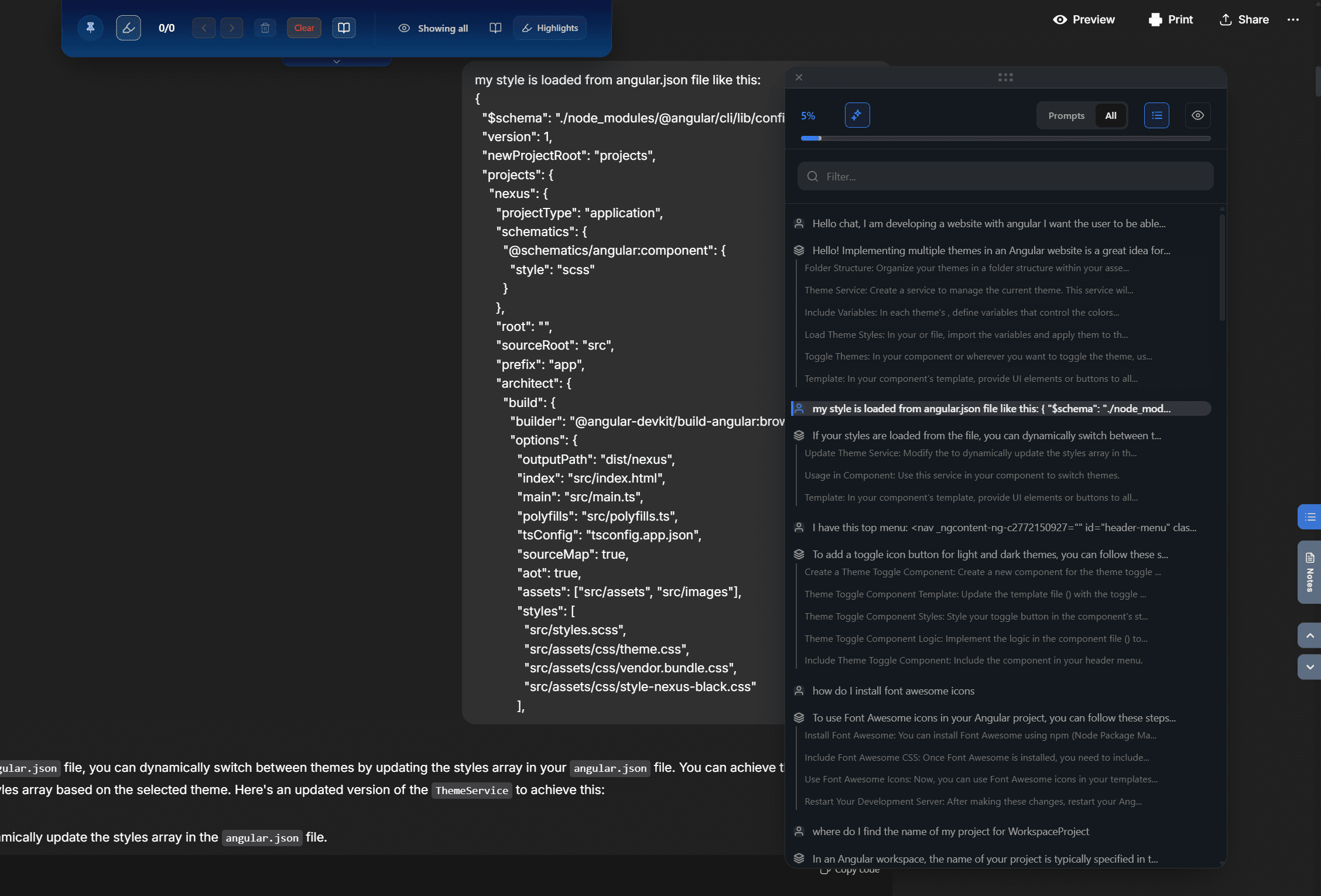
ChatGPT has no minimap or outline — long conversations mean endless scrolling. Smart Conversation Outline, part of the AI Workspace extension, adds a floating sidebar with every message, a visual progress bar, filters (your questions vs AI answers), and instant in-thread search. Toggle it with Cmd/Ctrl + . and click any entry to jump straight there.
Built for long conversations
Jump to any message
Every message becomes a clickable entry in the outline. One click and you're there — no scrolling.
Smart filtering
Show only your questions, or only the AI's responses, to skim the structure of a long session.
Instant search
Search within the thread and jump straight to the matching message.
Visual progress bar
Always know where you are in the conversation, even hundreds of messages deep.
Keyboard-first
Cmd/Ctrl + . toggles the outline. Built for power users who live in AI chats.
ChatGPT, Claude & Grok
The same outline works on every major AI assistant — one navigation habit everywhere.
What this looks like in practice
A researcher runs a literature-review thread that has grown past 300 messages over two weeks. The summary she needs is "somewhere in the middle" — natively, that means minutes of scrolling and skimming every time.
With the outline open she filters to her own questions, spots the section instantly, and jumps there in one click. Combined with Smart Thread Trimming the same thread also stops lagging — 73% less memory, 80% faster scrolling.
ChatGPT minimap FAQ
Does ChatGPT have a minimap or outline?
No. ChatGPT offers no overview of a conversation — the only way to move through a long thread is scrolling. Smart Conversation Outline in AI Workspace adds a floating sidebar that lists every message and lets you jump to any point with one click.
How does the Smart Conversation Outline work?
It reads the messages in your open conversation and builds an interactive table of contents with a visual progress bar. Click any entry to jump there instantly. You can filter to show only your questions or only AI responses, and search within the thread.
Is there a keyboard shortcut?
Yes — press Cmd/Ctrl + . to toggle the outline in any conversation.
Does the outline slow down long conversations?
No — the opposite. Pair it with Smart Thread Trimming and long conversations get dramatically faster: 73% memory reduction and 80% faster scrolling, because old messages are hidden from the page (not deleted) while the outline keeps them reachable.
Which platforms does it work on?
Smart Conversation Outline works on ChatGPT, Claude, and Grok, with the same shortcut and interface everywhere.
Is the minimap free?
AI Workspace is free to install and the core features are free forever. The full Smart Conversation Outline is part of the Pro plan ($7.99/month billed annually), together with unlimited prompts, notes, vaults, and encrypted storage.
Stop scrolling. Start jumping.
Add to Chrome – FreeFree forever • No credit card required • Install in seconds